
For a small business, technology often feels like a source of unexpected costs and frustrating disruptions. When a server fails or a security threat emerges, operations can grind to a halt. The traditional approach involved waiting for something to break and then calling for an emergency fix—a reactive model known as "break-fix."
This cycle is not just inefficient; it's a significant business risk. It means technology is only addressed when it has already become a problem, leading to unpredictable expenses and costly downtime. Managed IT services offer a fundamentally different approach, shifting technology management from a reactive liability to a proactive, strategic asset.
What Are Managed IT Services?
Managed IT services provide proactive management of a company's technology infrastructure and end-user systems, typically for a predictable monthly fee. Rather than reacting to problems as they occur, a managed services provider (MSP) works to prevent them from happening in the first place.
Think of it as the difference between emergency repairs and preventative maintenance. You could wait for a critical piece of equipment to fail during a busy period, or you could have a specialist perform regular maintenance to ensure reliability. One is a stressful, expensive crisis; the other is a practical measure that supports operational continuity.
An MSP functions as an outsourced IT department, delivering continuous monitoring, maintenance, and support. Their primary goal is to keep your systems running reliably and securely, allowing you to focus on core business activities. This proactive model is now the standard for effective IT management, with the global managed services market projected to reach $116.25 billion by 2030, according to recent MSP industry growth analyses.
The table below clarifies the key differences between these two models.
Managed Services vs. Traditional IT Support
| Attribute | Managed IT Services | Traditional IT Support (Break-Fix) |
|---|---|---|
| Approach | Proactive: Aims to prevent issues before they disrupt business. | Reactive: Waits for systems to fail before taking action. |
| Cost Structure | Predictable: Flat monthly fee for comprehensive support. | Unpredictable: Hourly rates and project fees, often during emergencies. |
| Goal | Maximize uptime, security, and efficiency to support business objectives. | Fix immediate problems as they arise. |
| Relationship | Strategic Partner: Aligns technology with long-term business goals. | On-Demand Vendor: Transactional relationship focused on repairs. |
| Downtime | Minimized through continuous monitoring and preventative maintenance. | Frequent and often lengthy, as issues are only addressed after they occur. |
As the table shows, the managed services model is built on partnership and prevention, transforming IT from a source of unpredictable costs into a stable, strategic asset.
Core Components of a Managed IT Partnership
So, what does this partnership entail in practice? A comprehensive managed services plan integrates several key functions to address all your technology needs:
- Proactive Monitoring and Maintenance: Your MSP continuously monitors your networks, servers, and computers. They identify potential issues and apply patches and updates behind the scenes to prevent problems from impacting your team.
- Strategic IT Guidance: You gain access to a virtual Chief Information Officer (vCIO) who helps develop a technology roadmap. This ensures your IT investments are strategic, cost-effective, and directly support your long-term business goals.
- Predictable Monthly Costs: You pay a flat monthly fee for comprehensive support, which simplifies budgeting and eliminates the financial shocks associated with break-fix IT.
- Enhanced Security Posture: Your provider implements and manages multiple layers of security—from firewalls to advanced threat detection—to protect your critical data and help you meet industry compliance requirements.
By combining these critical functions, managed IT services for small business provide a stable and secure technology foundation. This frees you to focus on running and growing your company, not worrying about IT.
Decoding a Typical Managed IT Services Plan
What is actually included in a managed IT services plan? This is a critical question for any business leader. Beyond the general promise of "proactive support," a quality plan is a bundle of specific services designed to keep your operations productive, secure, and aligned with your business objectives. It is about converting technical tasks into tangible business advantages.
At its core, a strong plan transitions you from the chaotic, expensive cycle of break-fix IT to a predictable, stable management model.
This visual captures that fundamental shift—from a reactive, problem-focused approach to a proactive, security-oriented partnership.
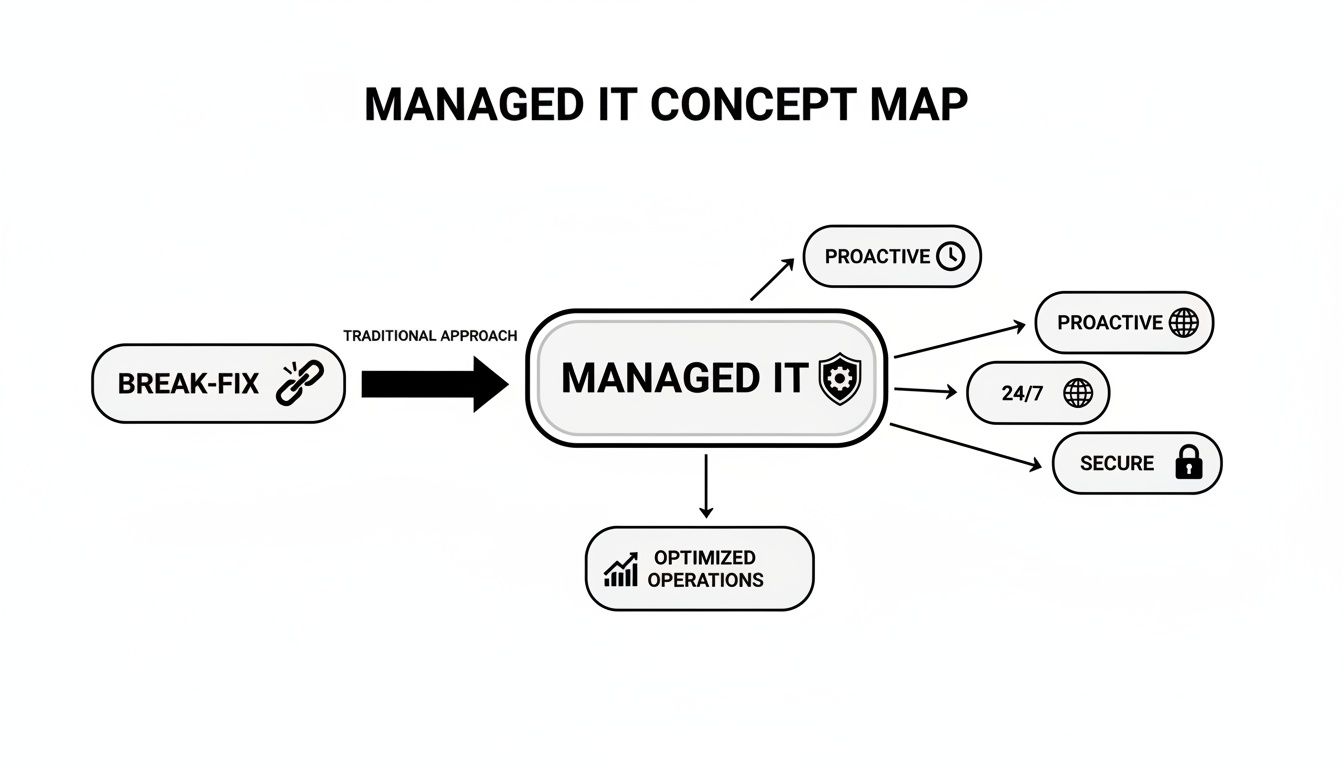
The key takeaway is that managed IT builds a protective framework around your operations. The focus is on 24/7 oversight and preventing problems before they start, not just responding to emergencies. This strategic difference is what transforms technology from a source of risk into a reliable asset.
Foundational Support and Monitoring
The most visible component of any managed IT plan is the daily support your team receives. This foundational layer is designed to eliminate technical friction and maintain productivity.
- 24/7 Network and Server Monitoring: Your provider constantly watches your critical systems for signs of trouble. This allows them to resolve performance issues or potential failures before they can disrupt business operations.
- Unlimited Helpdesk Support: When an employee encounters a technical issue—from a software glitch to a password problem—they have immediate access to a team of experts. This prompt support minimizes frustration and lost productivity.
These services ensure that the technology your business relies on remains a tool for progress, not a barrier.
Security and Business Continuity
Protecting your data is just as important as keeping your systems operational. A solid managed IT plan layers multiple security and preparedness measures to defend against modern threats.
A robust managed IT plan doesn't just react to threats; it builds a resilient operational framework. By combining proactive monitoring with strategic backup and recovery, it ensures your business can withstand and quickly recover from disruptions, protecting both your data and your reputation.
Key security services typically include:
- Threat Detection and Response: Advanced tools continuously scan for malicious activity, such as phishing attempts and ransomware, enabling a swift response to contain and neutralize threats.
- Data Backup and Disaster Recovery: Your critical business data is backed up regularly to a secure, off-site location. In the event of a system failure, natural disaster, or cyberattack, these backups enable a rapid recovery.
- Patch Management: Your provider ensures that all your software and systems are consistently updated with the latest security patches, closing vulnerabilities that cybercriminals exploit.
A truly comprehensive plan should also incorporate IT Asset Management (ITAM) best practices to track, secure, and manage all your technology assets throughout their lifecycle.
Strategic Infrastructure and Cloud Management
Beyond daily support and security, a true IT partnership provides strategic guidance on your core infrastructure. This ensures your technology can scale and adapt as your business grows.
This includes managing both physical hardware and cloud platforms. Your provider helps you optimize investments in platforms like Microsoft 365 and Azure, ensuring they are configured for maximum performance, security, and collaboration. To learn more about this critical component, you can explore our overview of managed infrastructure services.
Finally, many plans feature a virtual CIO (vCIO). This is not just a technician but a high-level advisor who collaborates with your leadership to create a technology roadmap that aligns with your business goals. A vCIO ensures that every dollar spent on technology is a strategic investment that drives long-term growth.
Understanding the True Cost and ROI of Managed IT
For any business leader, the bottom line is paramount. When evaluating managed IT services, it is easy to focus on the monthly fee, but this is only part of the financial picture. The true value emerges when you consider cost savings from risk reduction and productivity gains.
Viewing managed IT as merely an expense is a common mistake. A more accurate perspective is to see it as a strategic investment that delivers returns by ensuring operational stability and efficiency. A proactive IT partner generates ROI by preventing costly problems and unlocking hidden value.
Demystifying Common Pricing Models
Managed services providers (MSPs) typically structure their pricing in a few standard ways. Understanding these models helps you select an agreement that aligns with your budget and operational needs.
- Per-User Model: You pay a flat monthly fee for each employee. This model is ideal for forecasting because it scales directly as you hire or downsize. It is a good fit for businesses where the number of employees drives the need for IT support.
- Per-Device Model: The monthly cost is based on the number of devices being managed, such as servers, workstations, and network hardware. This structure works well when your business relies on a core set of critical equipment, regardless of the number of users.
- Flat-Fee Model: This all-inclusive option covers your entire IT environment for one predictable monthly price. It offers the most certainty for budgeting and is often customized to your specific infrastructure, security, and support requirements.
The right model depends on your business. A professional services firm with a stable team might find the per-user model most logical, while a manufacturing facility with extensive specialized machinery could benefit more from a per-device plan.
Calculating the Hidden Return on Investment
The real ROI of managed IT services for small business becomes clear when you account for the costs you avoid. These savings often exceed the monthly fee. A proactive approach systematically reduces financial and operational risks that can hinder a growing company.
According to industry statistics and trends, businesses that partner with an MSP can reduce their overall IT costs while improving efficiency and security.
The most significant financial benefit of managed IT is not in what you spend, but in the catastrophic costs you prevent. Avoiding a single data breach or major server outage can easily justify the cost of proactive service for years.
Consider these key areas where a quality MSP delivers substantial value:
1. Drastically Reduced Downtime
Unplanned downtime is a silent profit killer. Every hour your systems are offline is an hour your team is not serving clients or generating revenue. An MSP's 24/7 monitoring and proactive maintenance prevent hardware failures, software bugs, and security threats from causing these costly disruptions.
2. Elimination of High In-House IT Overhead
Building an internal IT team is a major financial commitment, including salaries, benefits, continuous training, and management overhead. Managed services provide access to a full team of certified experts for a cost that is often less than hiring a single senior technician.
3. Enhanced Employee Productivity
Slow computers, network latency, and recurring software glitches impede momentum. With unlimited helpdesk support, technical problems are resolved quickly, allowing your employees to remain focused on their core responsibilities. Knowing how to properly approach scaling IT for business growth is a critical part of this.
Navigating Security and Compliance Challenges
If your business operates in a regulated industry such as finance, healthcare, or law, compliance is not optional—it is a requirement. A single data breach or compliance failure can result in severe financial penalties, reputational damage, and loss of client trust. Here, a skilled managed services provider (MSP) becomes a critical partner in risk management.
An MSP helps you navigate complex regulations like PIPEDA or HIPAA by implementing and managing the technical controls necessary to protect sensitive information. The right partner does not just react to problems; they help you build an IT environment that is secure by design.

Building a Defensible Security Posture
A proactive MSP understands that effective security is not about a single tool but about deploying multiple layers of protection. This layered strategy, often called "defense-in-depth," creates a resilient defense against modern cyber threats by ensuring there is no single point of failure.
Key security controls often include:
- Advanced Firewall and Network Security: Acts as the perimeter defense for your digital environment, monitoring all incoming and outgoing network traffic and blocking suspicious activity based on a defined set of security rules.
- Data Encryption: Converts sensitive data into an unreadable format, protecting it both at rest (on your servers) and in transit (moving across the internet).
- Secure Access Management: Implements measures like multi-factor authentication (MFA) and the principle of least privilege to ensure that only authorized individuals can access critical systems and information.
- Employee Security Training: Your team is the first line of defense. Regular training helps them recognize phishing scams and other social engineering tactics, transforming them from a potential vulnerability into a human firewall.
When evaluating an MSP's security offerings, it is important to understand their complete approach. For a deeper look at building a comprehensive defense strategy, review our guide on managed cybersecurity services.
Proactive Assessments and Compliance Management
Maintaining compliance is an ongoing process, not a one-time task. A quality MSP provides continuous oversight to ensure your business remains compliant as regulations evolve and new threats emerge.
The goal of managed security is not just to install tools, but to create a living security program. Regular assessments, continuous monitoring, and strategic adjustments are what turn a reactive checklist into a resilient and defensible compliance framework.
This is achieved through several core activities:
- Regular Vulnerability Assessments: Your provider systematically scans your networks and systems to identify known weaknesses that could be exploited by attackers.
- Security Audits and Reporting: You receive detailed reports that provide a clear view of your security posture, which is essential for demonstrating due diligence to auditors and regulators.
- Incident Response Planning: In the event of a breach, a pre-defined plan ensures a rapid, coordinated response to minimize damage and meet any legal notification requirements.
For small businesses, this proactive management is invaluable. It is also important to consider the entire technology lifecycle; understanding data security in IT asset disposition best practices is vital for long-term protection. By partnering with the right MSP, you can confidently protect your data, meet your obligations, and focus on your business.
How to Choose the Right Managed IT Partner
Selecting a managed IT services provider is not simply about hiring a vendor to fix computers. It is about engaging a long-term strategic partner who will directly impact your efficiency, security, and ability to scale. A decision based solely on price misses the most critical factors. You need a partner who understands your business goals.
The right provider becomes an extension of your team. They offer guidance, understand your industry's specific challenges, and help develop a technology plan that supports your growth. This requires looking beyond the sales pitch to evaluate their technical expertise, industry experience, and client service approach.
Assessing Technical Expertise and Certifications
First, you must verify that they possess the technical capabilities to manage your systems. Look for tangible proof of their expertise and commitment to ongoing professional development.
Key indicators of competence include:
- Vendor Partnerships: Partnerships with major technology companies like Microsoft, Cisco, or Dell demonstrate a high level of proficiency with the tools your business depends on.
- Team Certifications: Inquire about the certifications their technicians hold. Credentials such as CompTIA A+, Network+, Security+, or Microsoft Certified Professional (MCP) confirm they have met verifiable industry standards.
- Specialized Expertise: If your business has specific needs, such as a complex cloud environment or strict compliance requirements, ask for evidence of their experience in those areas.
Verifying Industry Experience
Every industry has unique challenges and regulatory requirements. A provider with experience in your sector—be it legal, healthcare, or finance—will be more effective from the start. They will already be familiar with the compliance frameworks and operational workflows you use.
Request case studies or client references from companies in your industry. This is the most direct way to confirm they can deliver relevant solutions and understand your business context.
Scrutinizing Service Level Agreements
The Service Level Agreement (SLA) is the cornerstone of your relationship. This contract defines the specific level of service you are paying for. Do not just skim it; review it carefully to understand the provider's commitments.
An SLA isn’t just a technical document; it's a promise of reliability. It must give you clear, measurable guarantees for how quickly they’ll respond and fix things, so when a problem hits, you know exactly what to expect.
Look for specific metrics, such as:
- Guaranteed Response Times: How quickly will they acknowledge a new support request?
- Resolution Times: What is the target for resolving issues, categorized by severity?
- System Uptime Guarantees: Do they promise a specific uptime, such as 99.9%, for your critical systems?
- Penalties for Non-Compliance: What are the consequences if they fail to meet these commitments?
Evaluating Communication and Cultural Fit
Ultimately, technical expertise and a strong SLA are insufficient if the provider is difficult to work with. Communication and cultural fit distinguish a mere vendor from a true partner.
During your evaluation, pay attention to how they communicate. Do they use excessive jargon, or do they explain technical concepts clearly? Do they listen to your concerns and business goals? A partner who takes the time to understand your vision will proactively identify technology solutions to help you achieve it. This alignment is the key to a successful partnership in managed IT services for small business.
Before making a final decision, ask direct questions to ensure a potential provider is the right fit. This checklist can serve as a starting point.
Vendor Evaluation Checklist
This checklist helps you compare potential managed IT service providers across the key areas that matter most: business stability, technical expertise, and support approach.
| Evaluation Area | Key Questions to Ask | What to Look For |
|---|---|---|
| Business & Strategy | How long have you been in business? Can you provide client references from my industry? | An established track record. Positive feedback from businesses similar to yours. |
| Technical Expertise | What are your team's core certifications? Do you have experience with our specific software/hardware? | Relevant certifications (CompTIA, Microsoft, Cisco) and proven experience with your technology stack. |
| Service & Support | What are your guaranteed response and resolution times in the SLA? What does your onboarding process look like? | Clear, measurable metrics in the SLA. A structured, well-documented onboarding plan. |
| Security & Compliance | How do you handle data security and privacy? Can you help us meet industry-specific compliance standards (e.g., PIPEDA)? | A multi-layered security approach. Direct experience with the regulations governing your industry. |
| Cultural Fit | How do you communicate with clients? Can you explain a complex technical issue in simple terms? | Clear, jargon-free communication. A sense that they listen and value your business goals. |
Using a structured evaluation process helps you make a decision based on a complete picture, not just a price quote. It enables you to find a partner who will not only solve today's problems but also help you build a more resilient and successful business.
The Onboarding Process and Your Long-Term Partnership
Transitioning your IT support may seem daunting, but a professional partner ensures the process is a methodical, seamless handoff, not a chaotic switch. A well-planned onboarding process minimizes disruption to your team while establishing the foundation for a strong, long-term relationship.
The process begins with a thorough discovery and audit phase. Your new provider will conduct a detailed assessment of your existing IT environment to understand every component, including network configurations, server health, software licenses, and security protocols. This initial step is critical for identifying risks and creating a precise transition roadmap.

What to Expect During the Transition
Once the audit is complete, the technical transition begins. This phase is carefully orchestrated to prevent downtime and allow your team to continue working without interruption.
A typical onboarding roadmap includes these steps:
- Deployment of Management Tools: The provider installs its remote monitoring and management (RMM) agents on your servers and workstations. This provides them with a proactive view of your system health and security from day one.
- Security and Backup Configuration: Essential security tools such as antivirus, firewalls, and data backup systems are configured and verified. This ensures your business is protected from the moment the partnership officially begins.
- Team Introduction and Training: Your employees are introduced to the new support system. They learn how to submit helpdesk tickets and whom to contact for assistance, ensuring a smooth transition for day-to-day issues.
This structured approach means that by the time the transition is complete, your systems are already being monitored and protected.
Nurturing a Strategic Long-Term Partnership
The completion of onboarding is not the end but the beginning. A true MSP relationship evolves beyond technical support into a strategic advisory role focused on your business growth. Your provider becomes a forward-thinking partner invested in your success.
The real value of a managed IT partnership is realized over time. It's about moving beyond reactive fixes to a state of proactive strategy, where technology becomes a reliable engine for achieving your core business objectives.
This ongoing collaboration is built on several key pillars:
- Regular Strategic Reviews: You will meet with your virtual CIO (vCIO) to review performance, discuss upcoming technology needs, and ensure your IT roadmap remains aligned with your business goals.
- Transparent Reporting: You receive clear, understandable reports on system health, security posture, and support ticket trends. This transparency promotes accountability and supports informed decision-making.
- Proactive Planning: Your MSP will help you budget for future technology needs, such as hardware refreshes and new software implementations. This prevents last-minute costs and ensures your infrastructure can support future growth.
This continuous cycle of review and planning is what distinguishes a vendor from a true partner. If you are ready to explore how a strategic IT partnership can benefit your business, let's start a conversation about your technology goals.
Your Questions About Managed IT, Answered
Considering managed IT services often brings up several questions for business owners. Here are straightforward answers to some of the most common inquiries to help clarify the value proposition.
Are Managed IT Services Really a Good Fit for a Small Business Like Mine?
Yes. In fact, small businesses often stand to gain the most. Managed IT provides access to a level of expertise and sophisticated security tools that are typically beyond the budget of a small in-house team.
It levels the playing field, allowing you to focus on growing your business without being distracted by technology issues or concerned about the latest cyber threat.
How Exactly Does This Help Me Reduce Costs?
The most significant savings come from preventing expensive problems. Proactive maintenance helps you avoid the costly downtime that halts operations.
You also eliminate the significant overhead associated with hiring, training, and retaining an internal IT staff. Furthermore, a predictable monthly fee simplifies budgeting and removes the risk of unexpected invoices for emergency repairs.
The proactive nature of managed IT services turns technology from an unpredictable expense into a stable, budget-friendly asset. By resolving issues before they cause costly disruptions, you protect both your operations and your bottom line.
What's the Difference Between Managed and Co-Managed IT?
Fully managed IT is when you outsource all your technology management to a provider. They become your complete IT department.
Co-managed IT is a partnership model where the provider works alongside your existing in-house IT staff. This is ideal if you need to augment your internal capabilities, fill a specific skill gap (like advanced cybersecurity), or free up your team to focus on more strategic initiatives.
How Long Does It Take to Get Everything Set Up?
The timeline can vary depending on the complexity of your current IT environment, but a professional provider can typically complete the onboarding process within a few weeks.
A quality partner will have a structured plan to ensure a smooth transition with minimal disruption. This usually involves a thorough audit, the deployment of their management tools, and a clear handoff for your team.
Can a Managed IT Provider Help Us Stay Compliant?
Yes, and this is a critical benefit. A qualified provider with experience in your industry can be instrumental in navigating compliance requirements.
Whether you are subject to HIPAA, PIPEDA, or other regulations, the right partner will implement and manage the necessary technical controls. They help build a defensible security posture, protecting sensitive data and enabling you to meet your legal obligations with confidence.
If you're ready to move from reacting to IT problems to building a proactive, strategic partnership, the team at Tricord I.T Solutions is here to help. We design managed IT roadmaps that align with your business goals, providing the security, efficiency, and peace of mind you need to grow. Schedule a consultation with us today to learn how we can build a secure and scalable foundation for your business.
Article created using Outrank