

Helpdesk IT support is a company's central point of contact for technology issues, requests, and questions. It is the frontline service responsible for ensuring employees can work efficiently without technical disruptions. A modern helpdesk functions as more than a reactive problem-solver; it is a strategic asset that minimizes operational risk, controls costs, and supports business objectives.
For business leaders, effective helpdesk IT support translates directly into tangible outcomes: reduced employee downtime, stronger data security, and improved productivity. It provides a structured framework for managing technology, transforming IT from an unpredictable expense into a reliable driver of business performance.
The Business Impact of Professional Helpdesk Support
Without a structured helpdesk, technology issues lead to lost productivity and significant security risks as employees attempt self-fixes or interrupt colleagues. A professional helpdesk provides a single, organized channel for resolving technical problems, from password resets to network connectivity issues, allowing staff to focus on their core responsibilities.
This centralized approach delivers key business benefits:
- Minimized Downtime: Every minute an employee cannot work due to a technical issue is a direct cost to the business. An efficient helpdesk resolves problems quickly, restoring productivity and protecting revenue.
- Enhanced Security: Technicians act as the first line of defense, managing user access, enforcing security policies, and identifying threats like phishing attacks. This helps protect sensitive data and maintain regulatory compliance.
- Improved Employee Productivity: Reliable, accessible technical support removes technology-related frustrations, improving morale and allowing employees to perform their jobs without interruption.
- Strategic Insight: Tracking support tickets reveals recurring problems and systemic weaknesses. This data is invaluable for making informed decisions about technology investments, process improvements, and employee training.
Ultimately, the objective is to create a stable and secure technology environment that supports strategic goals. This is particularly relevant for businesses in the Caribbean, where a recent survey found 55% of senior executives believe their data protection capabilities require significant improvement. Discover more insights from the PwC 2024 Caribbean Digital Readiness Survey.
The Two Core Delivery Models
Businesses typically establish a helpdesk in one of two ways: by building an internal team or by partnering with an external provider. It is also helpful to understand the distinction between a service desk vs help desk, as the terms often indicate the strategic scope of IT services offered. Each model presents different implications for cost, expertise, and operational flexibility.
The choice between an in-house team and an outsourced partner is a significant strategic decision. Let's examine the practical differences between each model.
Comparing In-House and Outsourced Helpdesk Models
| Factor | In-House Helpdesk | Outsourced (Managed) Helpdesk |
|---|---|---|
| Cost Structure | High upfront and ongoing costs (salaries, benefits, training, tools). | Predictable monthly fee. Lower total cost of ownership. |
| Expertise | Limited to the knowledge of your internal team. | Access to a broad team of certified experts with diverse skills. |
| Availability | Typically limited to standard business hours. | Often provides 24/7/365 support, including holidays. |
| Scalability | Difficult and slow to scale up or down with business needs. | Easily scalable. Add or remove support as your team grows or shrinks. |
| Focus | Internal team may be pulled into other projects, dividing their focus. | Dedicated focus solely on providing IT support and improving service. |
| Tools & Tech | Requires significant investment in ticketing systems and remote tools. | Leverages enterprise-grade technology without direct cost to you. |
The optimal path depends on your organization's specific requirements, resources, and long-term objectives. While an in-house team can provide deep institutional knowledge, an outsourced partner often delivers broader expertise and greater flexibility at a more predictable cost.
The Anatomy of a High-Performing Helpdesk
A high-performing helpdesk is not merely a group of technicians answering calls; it is a structured system designed for efficiency, accountability, and reliability. It functions as a business's technical command center, ensuring every issue, from a minor password reset to a critical server outage, is managed methodically.
This system ensures routine issues do not distract senior experts, while complex problems receive the specialized attention required. This structure transforms chaotic troubleshooting into a predictable and well-managed business function.
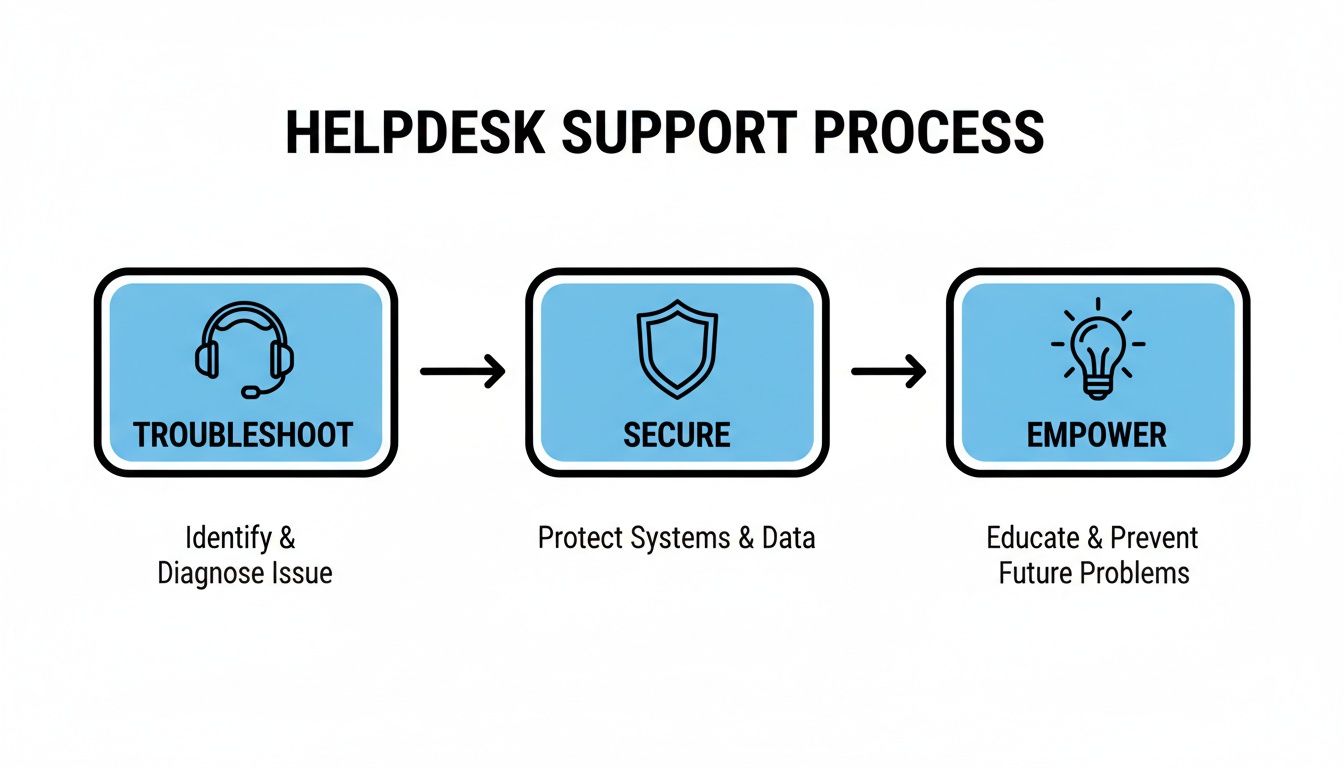
As shown, a single support request initiates a defined sequence of actions designed not only to fix the immediate problem but also to secure the environment and empower the user.
The Tiered Support Structure
An efficient helpdesk relies on a tiered support model. This structure acts as an intelligent filter, allocating resources based on issue complexity and ensuring a logical escalation path.
-
Tier 1 Support: This is the first point of contact for all user issues. These technicians handle common problems like password resets, software installations, and basic connectivity issues, aiming to resolve a high volume of requests quickly using documented procedures. If an issue is beyond their scope, they gather essential information and escalate it.
-
Tier 2 Support: When an issue is too complex for Tier 1, it is escalated here. Tier 2 technicians possess deeper technical knowledge to address advanced software troubleshooting, network problems, or issues affecting multiple users.
-
Tier 3 Support: This is the highest level of technical support, comprising specialists such as network engineers, system administrators, or cybersecurity experts. They handle the most critical and complex issues, such as server failures, widespread outages, or security incidents, which often require expert-level problem-solving.
This tiered system ensures your most valuable technical experts focus exclusively on the most challenging issues, which is a more cost-effective approach to managing IT resources.
From Ticket Creation to Resolution
Every request received by the helpdesk is logged as a support ticket. This ticket serves as a complete record of an issue, documenting who reported the problem, when it was reported, every step taken toward resolution, and when it was closed.
This ticketing process is vital for several key reasons:
- Accountability: It creates a clear audit trail, ensuring every request is acknowledged and addressed.
- Visibility: It provides business leaders with data on support volume and, critically, the time required for resolution.
- Pattern Recognition: Analyzing ticket data helps identify recurring problems that may indicate a larger underlying issue, such as the need for employee training or a hardware upgrade. For more information on a specific topic, you can learn more about network support services on our blog.
The Role of Service Level Agreements (SLAs)
A Service Level Agreement (SLA) is a formal commitment between a business and its IT support provider that defines the expected level of service. It is a critical document for setting clear, measurable expectations.
An SLA is more than a technical document; it is a business guarantee. It contractually obligates your IT partner to respond and resolve issues within a specified timeframe, which is essential for risk management, particularly in regulated industries.
Key metrics defined in an SLA typically include response time (how quickly the helpdesk acknowledges a request) and resolution time (how long it takes to solve the problem). For businesses in finance or legal services, where downtime has direct financial and compliance consequences, a strong SLA is non-negotiable.
Choosing the Right Helpdesk Model for Your Business
Selecting the right helpdesk model is a critical decision with direct implications for your budget, operational efficiency, and risk exposure. The choice between an in-house team and an outsourced partner depends entirely on your company’s size, resources, and strategic goals.
An in-house team can offer deep company knowledge and direct control. However, the investment extends beyond salaries to include the ongoing costs of recruitment, specialized training, and the necessary software for ticketing and remote support. Furthermore, providing coverage after hours or on holidays can become a significant logistical and financial challenge for an internal team.
The Case for an In-house Helpdesk Team
An in-house helpdesk can be an ideal fit for organizations with unique, proprietary systems or those that value having IT staff deeply integrated into daily operations. The primary advantage is a team that possesses an intimate understanding of your company’s specific workflows and priorities.
Key benefits of an in-house team include:
- Unmatched Institutional Knowledge: Internal staff develop a deep understanding of your business, its people, and its IT history, which is invaluable for resolving complex, context-specific issues.
- Direct Control and Oversight: You have direct control over the team’s priorities and can pivot their focus to align with new business objectives without managing a third-party relationship.
- Strong Cultural Alignment: An in-house team is part of your company culture, which can lead to better rapport with employees and a more personalized support experience.
However, the hidden costs can be substantial. Attracting and retaining top IT talent is competitive and expensive, and the total cost of ownership must account for ongoing professional development, software licensing, and providing coverage for staff absences.
The Strategic Advantages of Outsourcing
For many growing businesses, an outsourced helpdesk from a Managed Service Provider (MSP) offers a more predictable, scalable, and cost-effective solution. This model provides access to a broad team of experts without the overhead associated with building an entire internal department.
This trend is reflected globally. The IT services market in the Caribbean, for example, has seen significant growth as businesses invest in technology to improve efficiency, particularly with cloud services supporting remote work. Read more about Caribbean IT market dynamics on Statista.com.
An outsourced helpdesk converts IT support from a large fixed cost into a predictable operational expense. This allows you to scale services up or down as business needs change, ensuring you only pay for what you use.
Partnering with an MSP delivers several key business advantages:
- Predictable Monthly Costs: A single, fixed monthly fee covers all support, simplifying budgeting and eliminating surprise expenses.
- Access to a Broad Skillset: You gain immediate access to a team of certified experts in networking, cloud technologies, and cybersecurity.
- Enhanced Scalability: As your business grows, your IT support scales with it without the delays of hiring and training.
- Improved Focus: Delegating IT management allows your leadership team to concentrate on core business goals instead of technical problems.
While loss of control is a common concern, a reputable MSP functions as a transparent extension of your team. They use secure, audited tools and provide detailed reports on performance and system security, ensuring you remain fully informed. When evaluating your options, a help desk software comparison can also help clarify which tools best support your operational needs and security standards.
The Helpdesk's Role in Security and Compliance
A professional helpdesk is a critical component of a company's security and compliance framework. In an environment of increasing cyber threats, helpdesk technicians serve as the first line of defense—the gatekeepers and frontline responders who integrate proactive security into routine IT support.
This operational discipline is vital. Every ticket handled, every user permission set, and every password policy enforced contributes directly to a stronger security posture. Without this centralized control, security efforts can become inconsistent, leaving dangerous gaps for threats to exploit.
Enforcing Security Policies at the User Level
An organization’s security is often only as strong as its least aware employee. A helpdesk enforces critical security policies at the user level, where they are most effective.
This extends beyond resetting passwords to actively managing the digital identities and access rights of every individual in the organization.
Key security functions include:
- Access Control Management: The helpdesk ensures employees have access only to the data and systems required for their jobs (the principle of least privilege). They manage the entire user lifecycle, from onboarding new hires with appropriate permissions to promptly deactivating accounts upon departure—a critical step in preventing data theft.
- Password Policy Enforcement: Technicians ensure that strong password requirements and mandatory changes are followed, dramatically reducing the risk of unauthorized access from weak or stolen credentials.
- Identifying Social Engineering: Trained helpdesk staff are skilled at recognizing the signs of phishing and other social engineering attacks. They can identify unusual requests and serve as a trusted point of contact for employees to report suspicious activity.
Supporting Your Compliance Obligations
For businesses in regulated industries such as law, finance, or healthcare, compliance is mandatory. Data privacy regulations require strict controls over how sensitive information is stored, accessed, and managed. A helpdesk's daily operations provide the documentation and enforcement needed to meet these standards.
An organized helpdesk creates an auditable trail for every user access request, system change, and security incident. This documentation is not just good practice; it is essential evidence that demonstrates due diligence to regulators and clients.
Every support ticket related to data access becomes a compliance record. This system demonstrates you have robust processes in place to protect client information and other sensitive data, directly supporting adherence to industry-specific regulations and forming a fundamental part of a comprehensive cybersecurity services strategy.
Integrating with Microsoft 365 for Enhanced Security
A modern helpdesk integrates deeply with core business platforms like Microsoft 365, transforming them into powerful security tools.
For example, a helpdesk IT support team can:
- Manage Multi-Factor Authentication (MFA): They can require and enforce MFA for all users, one of the most effective measures against account compromise.
- Monitor for Suspicious Activity: By integrating with Microsoft’s security tools, they can monitor for and investigate suspicious login attempts from unusual locations or at odd hours.
- Control Data Access in SharePoint: The team can configure and manage complex permissions within Microsoft 365 and SharePoint, ensuring confidential documents are accessible only to authorized personnel.
This integration elevates the helpdesk from a reactive support function to a proactive security hub that actively safeguards your most critical business platforms.
How to Evaluate an Outsourced Helpdesk Provider
Choosing the right IT partner is a critical decision that impacts your company's stability, security, and growth. When evaluating helpdesk IT support providers, you need a structured approach that goes beyond price comparisons to find a long-term partner whose technical capabilities, processes, and business acumen align with your own.
The goal is to find a provider that functions as a natural extension of your team—one that delivers clear business value, not just ticket closures. A thorough vetting process will distinguish a basic vendor from a strategic partner invested in your success.
Assessing Technical Expertise and Industry Experience
Not all helpdesk providers are created equal. You need a partner with proven expertise relevant to your technology stack and, more importantly, your industry. Generic support is insufficient, especially when dealing with compliance or regulatory requirements.
Begin by asking specific questions about their team and track record:
- Certifications and Specializations: Do their technicians hold relevant certifications (e.g., Microsoft, CompTIA, Cisco)? Do they have deep knowledge in networking, cloud infrastructure, or cybersecurity?
- Industry-Specific Knowledge: Have they worked with other firms in your sector, such as law, finance, or healthcare? Can they speak knowledgably about your specific compliance and operational challenges?
- Security Protocols: How do they protect their own systems and your data? Inquire about their internal security policies, data encryption practices, and staff background checks.
A provider with experience in your industry significantly reduces risk. A team that already understands your compliance needs and operational pressures can deliver more effective, relevant support from day one.
Confirming their technical depth ensures they can resolve today’s problems and guide your technology strategy as your business evolves.
Scrutinizing the Service Level Agreement
The Service Level Agreement (SLA) is the most important document in your relationship with a helpdesk provider. It is the contract that formalizes their service commitments.
Pay close attention to these critical details within the SLA:
- Response Time vs. Resolution Time: Response time is how quickly they promise to acknowledge your ticket. Resolution time is how long it takes them to fix the problem. A fast response is meaningless if the issue persists for days.
- Business Hours vs. 24/7 Support: Clarify what "support hours" includes. Does it cover weekends and holidays? Are there additional fees for after-hours service?
- Escalation Procedures: A strong SLA will clearly define the process for escalating critical issues. It should specify how different priority levels are handled so you have a clear path forward during a crisis.
A well-defined SLA is your tool for clarity and accountability, ensuring the provider's service delivery aligns with your business's operational needs.
Evaluating Communication and Client Focus
Technical skill is only half the equation. The provider’s communication style and commitment to client service are equally important. You are building a partnership that requires a responsive, transparent, and collaborative team.
Assess their communication practices during your evaluation:
- Proactive Reporting: Do they provide regular, easy-to-understand reports on key metrics like ticket volume, resolution times, and recurring issues?
- Client Testimonials and References: Request to speak with current clients, preferably in your industry. A provider confident in their service will gladly connect you with references.
- Pricing Transparency: Analyze their pricing model for hidden costs related to on-site visits, after-hours support, or specific project types. Ensure their proposal is straightforward and predictable.
Following these steps will help you select a helpdesk provider that not only resolves technical issues but also actively supports your broader business objectives. For a deeper look at this model, explore our guide on what managed IT services can offer your business.
Your Next Steps Toward Strategic IT Support
Transitioning from a reactive, break-fix IT model is a significant step for any business. Professional helpdesk IT support is not just an operational expense—it is a competitive advantage that strengthens security, improves productivity, and helps manage business risk.
The path forward begins with a clear assessment of your current situation. A thoughtful approach ensures your next technology investment aligns directly with your long-term goals.
Begin with an Internal Assessment
Before evaluating external solutions, look inward to identify and document your company’s current technology pain points.
What are the recurring technical issues that disrupt your team’s workflow? Consider everything from slow network performance and software bugs to challenges with remote access. Understanding these frustrations provides a clear baseline for what needs to change. This process is essential for any business, and you can learn more about how targeted support helps in our article on small business IT support.
Define Your Business Requirements
After mapping your current challenges, define your non-negotiable business requirements. This involves connecting IT functions to specific business outcomes.
Focus on these critical areas:
- System Availability: What are the uptime requirements for your mission-critical applications? How much downtime can your business tolerate?
- Data Security: What specific security protocols are needed to protect client data, financial records, and other sensitive information?
- Regulatory Compliance: If you operate in a regulated industry, list the specific compliance standards you must meet.
Explore Your Options with Purpose
With a clear understanding of your pain points and requirements, you are prepared to explore your options effectively. Use the evaluation criteria from the previous section to systematically vet potential solutions.
Whether you choose to enhance your internal team or engage a managed IT partner, this structured approach ensures your decision is driven by strategic needs, not just immediate technical problems. This process will help you find a partner or build a team that not only resolves issues but actively contributes to your business's growth and resilience.
Got Questions About Helpdesk Support? We’ve Got Answers.
Here are answers to common questions business leaders have when considering a new or outsourced helpdesk solution.
How Does a Helpdesk Work with Our Microsoft 365 Setup?
A professional helpdesk acts as the administrative command center for your Microsoft 365 environment. Technicians manage everything from user accounts and license assignments to configuring critical security settings. They enforce multi-factor authentication, manage SharePoint permissions, and resolve email issues directly. This ensures your Microsoft 365 investment runs smoothly, securely, and in line with best practices.
What Does the Onboarding Process Usually Look Like?
A structured onboarding process is designed to minimize business disruption. It begins with a discovery phase, where the provider learns about your network, software, and business operations. Next, they deploy secure monitoring and management tools to your systems. Finally, they document your environment, create user accounts, and establish clear communication channels. A good partner manages this transition seamlessly, providing clear timelines and ensuring your team knows who to contact from day one. This step is critical for effective helpdesk IT support.
How Can a Helpdesk Actually Improve Our Cybersecurity?
A modern helpdesk is a proactive security function, not just a reactive support team. They are on the front lines managing critical tasks like deploying software patches, maintaining up-to-date antivirus software, and ensuring security policies are followed.
Your helpdesk is your first line of defence. They train users to spot phishing emails and are the first point of contact for reporting anything suspicious. By centralizing these duties, they create consistent security hygiene across the board.
This proactive approach transforms IT support from a cost center into a powerful tool for managing risk and a vital component of your overall security strategy.
Will We Lose Control if We Outsource Our Helpdesk?
With the right partner, you gain more strategic control, not less. A reputable managed service provider (MSP) operates with full transparency, providing detailed reports on performance, ticket resolutions, and overall system health. You set the priorities and define success through a Service Level Agreement (SLA). The MSP handles the daily technical management, freeing your leadership to focus on strategic business growth. It is a partnership built on accountability and shared objectives.
At Tricord I.T Solutions, we provide the strategic guidance and expert support needed to transform your technology from a liability into a competitive advantage. If you're ready to align your IT with your business goals, let’s discuss how our managed IT and cybersecurity services can help.