
Deciding between cloud and on-premise IT infrastructure is a core business decision, not just a technical one. The fundamental difference is straightforward: cloud computing offers scalability and predictable operational spending, ideal for businesses focused on growth and flexibility. In contrast, on-premise infrastructure provides complete physical control over data and hardware through a traditional capital investment. Your choice will directly impact operational agility, long-term costs, security posture, and your ability to meet regulatory compliance.
This guide provides a practical framework for business leaders to evaluate these options based on risk, cost, and operational impact.
An Executive Framework for Your Cloud vs On-Premise Decision
For business leaders, framing this decision correctly is the first step toward building a resilient and efficient IT foundation. The core trade-off is between the agility of a service-based model and the total control of owning your hardware. To properly frame this, it's essential to understand what cloud-based solutions are and how they function in a business context.
An on-premise setup means your business owns and manages all servers, storage devices, and networking equipment within its own facilities. This model grants you ultimate control over your data and security configurations but requires a significant upfront capital investment and substantial internal resources for ongoing maintenance and management.
In contrast, cloud computing delivers IT resources—such as servers, storage, and software—over the internet from providers like Microsoft Azure. Instead of buying hardware, you pay a recurring fee to access these services. This approach converts your IT spending from a capital expenditure (CapEx) to an operational expenditure (OpEx), offering greater financial predictability and flexibility. You can learn more about framing these kinds of strategic decisions by understanding modern technology adoption for a competitive edge.
This decision tree helps visualize the first question that often steers the evaluation.
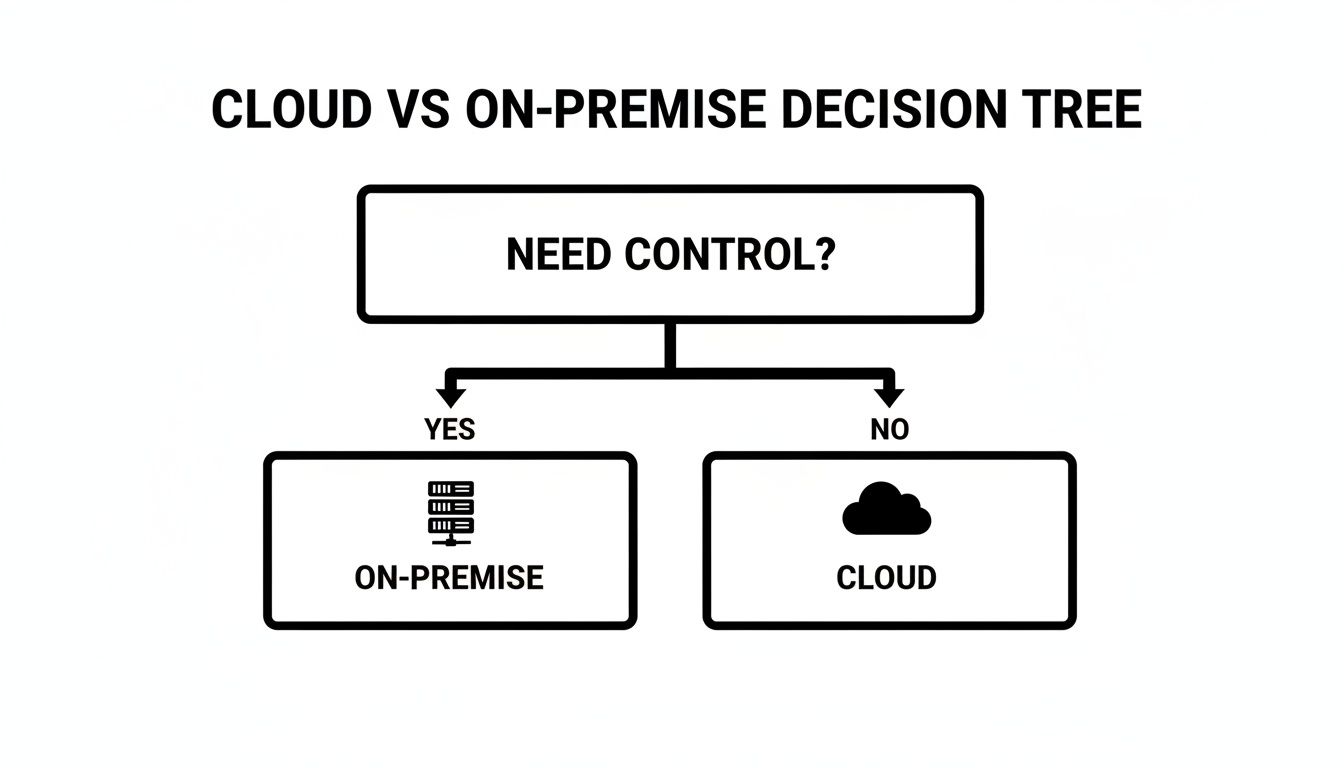
As the graphic illustrates, if your business requires absolute physical control over hardware and data for compliance or operational reasons, an on-premise solution is often the starting point. However, if your priority is flexibility and the ability to scale, the cloud becomes a compelling alternative.
At-a-Glance Comparison: Cloud vs On-Premise
A side-by-side comparison helps clarify the core differences. This table offers a high-level view of how cloud and on-premise models stack up across key business factors.
| Decision Factor | Cloud Computing | On-Premise Infrastructure |
|---|---|---|
| Cost Model | Operational Expenditure (OpEx) – predictable, recurring monthly or annual fees. | Capital Expenditure (CapEx) – large upfront investment in hardware and software. |
| Control | Limited physical control; control is at the software and configuration level. | Complete physical control over all hardware, software, and data. |
| Scalability | High elasticity; resources can be scaled up or down instantly as needed. | Limited; scaling requires purchasing and deploying new physical hardware. |
| Maintenance | The cloud provider manages all hardware maintenance, updates, and physical security. | Your internal team is fully responsible for all maintenance, patches, and repairs. |
Each model presents a distinct path. The cloud offers a pay-as-you-go journey where a third party handles the infrastructure management, while on-premise puts you in control but makes you responsible for every aspect of the infrastructure.
Cost, Security, and Compliance: The Business Impact
For businesses, particularly those in regulated industries, choosing between cloud and on-premise infrastructure is a strategic decision that directly shapes financial planning, security readiness, and compliance. Getting these three areas right is critical to selecting a path that fits your operational needs and risk tolerance.
The first major consideration is financial: is your business structured for monthly operational spending (OpEx) or large, upfront capital investments (CapEx)? Cloud services operate on an OpEx model. You pay a predictable monthly fee that covers hardware, maintenance, and support, avoiding a massive initial cash outlay.
On-premise infrastructure is a classic CapEx model. It demands a significant upfront investment in servers, networking gear, and the physical space to house it. Beyond the initial purchase, you are responsible for ongoing power, cooling, maintenance contracts, and the IT staff required to manage it.
Understanding the Total Cost of Ownership (TCO)
A common mistake is to compare only the initial hardware cost with the monthly cloud subscription fee. To gain a true financial understanding, you must analyze the Total Cost of Ownership (TCO), which includes all direct and indirect costs over the system's lifecycle.
For an on-premise solution, the TCO includes:
- Hardware and Software: The initial purchase of servers, storage, networking equipment, and software licenses.
- Operational Costs: Ongoing expenses for electricity, cooling, and physical security for your server room.
- Personnel: Salaries for the IT staff needed to manage, maintain, and secure the infrastructure.
- Maintenance and Upgrades: Costs of replacing aging hardware, renewing support contracts, and purchasing software updates.
For a cloud solution, the TCO is structured differently:
- Subscription Fees: The core monthly or annual cost for compute, storage, and other services.
- Data Transfer Costs: Fees for moving data into and out of the cloud environment, which can add up if not monitored.
- Management and Optimization: The cost of expert resources—internal or external—to ensure security and cost-efficiency.
- Integration Costs: The expense of connecting cloud services with any remaining on-premise applications.
The significant growth in cloud adoption reflects a clear preference for flexible cost models. Public cloud spending in Canada is projected to reach approximately US$17.8 billion in 2025, a substantial increase from US$5.8 billion in 2019. This trend indicates that businesses are realizing tangible financial and operational benefits by shifting away from traditional on-premise investments.
Navigating Security and the Shared Responsibility Model
A common myth is that one model is inherently more secure than the other. In reality, security is not about the physical location of a server; it's about how well the environment is managed and who is responsible for each security layer.
Security is not about location but about implementation. A well-configured cloud environment can be more secure due to the provider's massive security investments, but it requires understanding the shared responsibility model. On-premise offers absolute control but places the entire security burden—and risk—on your business.
With an on-premise setup, your business owns 100% of the security responsibility. From physical security of the server room to firewall configuration, vulnerability patching, and incident response, the entire burden falls on your team. This provides ultimate control but also concentrates all risk and resource strain internally.
Cloud security operates on a shared responsibility model. The cloud provider (like Microsoft Azure) is responsible for securing the cloud itself—their physical data centers, servers, and networks. You are responsible for securing what you put in the cloud—your data, applications, and user access controls. This allows you to leverage their multi-billion-dollar security investments but requires a focus on proper configuration and management. Our team can help you navigate this with our dedicated cloud managed IT services.
Meeting Canadian Compliance and Data Residency Rules
For any Canadian business in sectors like law, healthcare, or finance, complying with regulations such as the Personal Information Protection and Electronic Documents Act (PIPEDA) is non-negotiable. A critical component of this is data residency—knowing and controlling the physical location of your data.
With an on-premise solution, data residency is straightforward, as your servers are located within your facilities. However, you are solely responsible for implementing, documenting, and proving every security control required for compliance audits.
Major cloud providers like Microsoft have addressed this by establishing data centers within Canada, allowing you to configure services to ensure your data never leaves the country. They also provide extensive certifications (e.g., ISO 27001) that can streamline compliance audits. The critical step is ensuring your cloud environment is correctly configured to enforce these data residency policies, as it is not always the default setting.
How Each Model Impacts Scalability and Performance
Your infrastructure’s ability to grow with your business determines whether you can capitalize on new opportunities or face operational bottlenecks. The differences between cloud and on-premise models in scalability and performance are significant and must be understood by business leaders.

The cloud is designed for elastic scalability. This means you can increase or decrease your computing resources—processing power, memory, storage—almost instantly and pay only for what you use. This agility provides a major competitive advantage, particularly for businesses with fluctuating workloads or seasonal demand.
Conversely, scaling on-premise infrastructure is a slow and deliberate process. It involves forecasting future needs, followed by a lengthy procurement, installation, and configuration cycle for new hardware. This process can take weeks or months, creating delays that hinder growth and impact time-sensitive projects.
The Agility of Cloud Scalability
Consider a professional services firm that secures a large project requiring massive data processing. This workload would overwhelm their existing on-premise servers. With a cloud setup, the firm can deploy numerous high-powered virtual servers in minutes, complete the analysis, and then decommission them once the project is finished.
This on-demand capability transforms IT from a capital-intensive obstacle into a flexible operational asset. It eliminates the need to over-provision expensive hardware "just in case," allowing you to align IT spending directly with immediate business needs.
For a growing business, the ability to scale on demand is not just a convenience—it's a strategic enabler. Cloud elasticity removes the friction between opportunity and execution, allowing you to say 'yes' to new projects without worrying about infrastructure limitations.
This flexibility is bidirectional. If business activity slows, you can reduce your cloud usage and cut costs immediately. With an on-premise model, you are left with idle hardware that continues to consume power and require maintenance. This is a primary reason businesses engage expert cybersecurity services to help manage and optimize their cloud environments.
Performance Considerations for Each Model
While the cloud has a clear advantage in scalability, the performance discussion is more nuanced. The key factor here is latency—the time it takes for data to travel between two points.
An on-premise server located in your office will almost always have lower latency for local users than a cloud server in a data center hundreds of kilometers away. For certain industries, such as high-frequency trading or precision manufacturing where every millisecond is critical, this can be a deciding factor.
However, for most standard business applications, the performance difference is often negligible, provided your network is properly configured. Cloud providers have invested billions in building high-speed global networks to minimize latency. A cloud solution's performance ultimately depends on:
- Your Internet Connection: A slow or unreliable internet connection will become a bottleneck, regardless of the cloud provider's capabilities.
- Provider Infrastructure: The performance and reliability of the cloud provider's own network and data centers are crucial.
In summary, on-premise infrastructure provides predictable, low-latency performance within your physical locations. The cloud delivers globally distributed, high-performance computing that relies on robust network connectivity. The right choice depends on your specific workloads and user locations. For many businesses, a well-designed cloud solution, often built around a platform like Microsoft 365, offers more than sufficient performance for daily operations while providing game-changing scalability.
Real-World Scenarios to Guide Your Decision
Theory is useful, but practical application is what matters. Your decision should be grounded in your daily operations, growth plans, and regulatory obligations, not industry hype.
Let's examine some practical scenarios where one model clearly has an advantage over the other.
When to Prioritize a Cloud-First Strategy
The cloud is ideal for businesses that value agility, support remote work, and require predictable spending. If any of the following scenarios describe your organization, a cloud-first approach is likely the best path forward.
- You Are Growing Rapidly: A professional services firm undergoing rapid expansion cannot afford to wait weeks for new hardware each time it hires a new employee. The cloud allows for the creation of new user accounts and access to tools like Microsoft 365 in minutes, ensuring productivity is not constrained by infrastructure.
- Your Team is Distributed: Consider a modern legal practice where lawyers work from the courthouse, home offices, and client sites. They require secure, universal access to case files and communication tools. A cloud platform delivers the necessary flexibility and centralized security to keep a distributed team synchronized and productive.
- You Need to Preserve Capital: A startup in the manufacturing sector must invest its initial capital in production equipment, not a server room. The cloud’s pay-as-you-go model converts a large capital expense into a manageable operational cost, freeing up funds for core business growth.
This strategic shift is widespread. It is anticipated that approximately 85% of Canadian enterprises will adopt a cloud-first strategy by 2025, and 90% of SMEs already use cloud services for critical functions like accounting and CRM. This trend underscores the importance of expert guidance in selecting the right provider and maintaining compliance.
When On-Premise Remains the Right Choice
Despite the momentum of the cloud, on-premise infrastructure remains the superior choice in specific situations where total control, regulatory compliance, or specialized performance are non-negotiable.
The decision to stay on-premise often has little to do with cost or convenience. It’s about managing unique risks, meeting strict compliance rules, or supporting specialized applications that just won't work in a shared environment.
Consider these situations:
- You Rely on Specialized, Legacy Applications: A financial services firm depends on a custom-built trading application that is tightly integrated with proprietary on-site hardware. Migrating this delicate system to the cloud would be prohibitively expensive and risky. In this case, an on-premise server is the only viable option.
- You Require Extreme Speed and Performance: A medical imaging center processes enormous files that demand near-instantaneous speeds for diagnostic work. Local on-premise servers deliver the ultra-low latency that is not achievable over an internet connection to a remote cloud data center.
- You Face Strict Data Sovereignty Mandates: A government contractor handles classified information that, by law, cannot leave a physically secured, company-controlled facility. On-premise infrastructure is the only way to satisfy these stringent regulatory demands for absolute physical control over data.
Finding a Middle Ground with a Hybrid Approach
For many businesses, the choice is not a binary "either/or" decision. A hybrid cloud strategy offers a practical, best-of-both-worlds solution by combining on-premise and cloud resources.
In a typical hybrid model, a business might migrate its email and collaboration tools to Microsoft 365 while keeping a critical, highly sensitive client database running on a secure server in its own office.
This approach allows you to modernize where it makes sense and gain cloud flexibility without disrupting core systems that function effectively. When considering specific services, such as your phone system, understanding the different cloud, on-premise, and virtual options for a PBX system is a perfect example of this evaluation. A hybrid model serves as a strategic bridge, enabling you to leverage cloud innovation while retaining direct control where it is most needed.
An Actionable Checklist for a Smooth Transition
Whether you are migrating to the cloud or upgrading your on-premise infrastructure, a successful transition depends on meticulous planning. The goal is to maintain business continuity while maximizing the return on your new investment. Proceeding without a solid framework is a common and costly mistake.
This checklist provides a structured approach to assess your organization's readiness for change, covering technology, processes, and people to identify potential issues before they disrupt operations.

Before making a move, you must understand your current environment. This checklist is not just an inventory of assets; it's a tool for understanding interdependencies and determining what is ready for the new environment.
Migration Readiness Checklist
| Assessment Area | Key Questions to Ask | Common Pitfalls to Avoid |
|---|---|---|
| Foundational Technology | Which applications are mission-critical? Do we have legacy systems incompatible with the cloud? Can our network handle the new load? | Underestimating the bandwidth required for cloud services. Forgetting about physical space and cooling needs for on-premise upgrades. |
| Governance & Compliance | How do we classify our data by sensitivity? Do our data handling policies meet PIPEDA requirements in a cloud model? | Assuming current data governance policies will automatically apply to the cloud. Neglecting to update the disaster recovery plan. |
| Operational & People | Who is communicating the change and why? What training will the team need for the new systems? Are our third-party vendors prepared? | Failing to secure buy-in from the team early in the process. Providing generic training that does not address new workflows. |
Addressing these questions helps you build a clear, actionable plan, transforming a potentially chaotic project into a managed and predictable transition.
Foundational Technology Assessment
Before any data is moved, you must have a complete understanding of your current technology foundation. This involves more than creating an inventory; it requires analyzing how all systems are connected and which are prepared for a new environment.
- Workload Analysis: Identify which applications are mission-critical. More importantly, determine which are legacy systems that may break or require a complete overhaul to function in a cloud environment.
- Infrastructure Review: Assess whether your current network has the bandwidth and low latency required to support cloud services without causing performance issues. If upgrading on-premise, confirm you have adequate power, cooling, and physical rack space.
- Security Architecture: Determine how you will adapt your security controls. A cloud migration often involves shifting from a traditional perimeter-based security model to an identity-focused approach, which may require a complete redesign of your security policies.
Governance and Compliance Readiness
Your compliance obligations do not disappear when you move to the cloud. You must align your governance policies with the new infrastructure model before the transition begins, not after the move is complete.
A common pitfall is assuming your current data governance policies will work seamlessly in the cloud. The shared responsibility model requires you to redefine controls for data access, residency, and retention to ensure you remain compliant.
Key governance steps include:
- Data Classification: Categorize all your data based on sensitivity levels (e.g., public, confidential, regulated). This classification dictates where data can be stored and which security controls are mandatory.
- Policy Alignment: Update your internal policies to reflect the new operational reality. This includes defining clear rules for data handling in a cloud or hybrid environment to comply with regulations like PIPEDA.
- Disaster Recovery Planning: Use the transition as an opportunity to review and update your business continuity strategy. A comprehensive IT disaster recovery plan template can provide essential guidance to ensure your plan is robust.
Operational and People Planning
Technology is only one part of the equation. The success of any transition ultimately depends on how well your team adapts to new ways of working. Underestimating the human element is a classic recipe for failure.
- Change Management: Develop a clear communication plan that explains why the change is necessary. This can significantly reduce resistance and gain buy-in from your team.
- User Training: Your team will require training on new systems, workflows, and security protocols. Proactive training ensures that productivity does not decline after the transition.
- Vendor and Partner Coordination: Confirm that your third-party software providers support the new environment. Keep all critical partners informed of your timeline to avoid unexpected integration issues.
Building Your Strategic IT Roadmap
Choosing between cloud and on-premise infrastructure is a foundational component of your long-term business strategy. This decision impacts your ability to scale, manage costs, and maintain a strong security posture for years to come. To make the right choice, you must move beyond a simple pro-con list and develop a clear, strategic IT roadmap that aligns your technology with your business goals.
An effective roadmap begins with an honest assessment of your current business state and future objectives. The best solution is one deliberately chosen based on your operational realities, growth plans, and regulatory responsibilities. A trusted IT partner can provide the necessary expertise to ensure no critical details are overlooked.
Defining Your Path Forward
The goal is to create a strategy that is tailored to your business, not to force your operations into a one-size-fits-all solution. Whether the best path is a full cloud migration, an upgraded on-premise system, or a practical hybrid model, the decision should be driven by clear criteria.
Here are the key steps to building that roadmap:
- Formal Business Goal Alignment: Map your one-, three-, and five-year business goals to specific technology requirements. For example, if rapid expansion is planned, scalability becomes a top priority.
- Comprehensive Risk and Compliance Review: Conduct a thorough review of your obligations under frameworks like PIPEDA and determine your tolerance for operational risk. This process often clarifies whether you need the direct control of an on-premise setup or the certified compliance of a major cloud provider.
- Workload and Application Analysis: Not all applications are created equal. Identify which workloads are suitable for the cloud and which legacy systems must remain on-site. This analysis will naturally guide you toward the most logical infrastructure model.
A strategic IT roadmap turns your technology from a recurring cost into a real competitive advantage. It ensures every dollar you invest in infrastructure directly supports your mission—whether that’s improving client service, entering new markets, or protecting sensitive data.
Ultimately, this process provides the clarity needed to make a confident, well-informed decision. With expert guidance, you can ensure your infrastructure is not just functional but a true enabler of your future success. If you are ready to build a strategic IT roadmap, we can help you with our Managed IT Services.
Frequently Asked Questions
Even after evaluating the options, business leaders often have practical questions about what these infrastructure models mean for their day-to-day operations. Here are answers to the most common questions we hear.
Which Model Is Truly More Secure?
Security is determined by implementation, not location. A common misconception is that on-premise is inherently safer because you can physically touch the server. This view overlooks the massive security investments made by major cloud providers.
A properly configured cloud environment can be more secure. You benefit from the provider's global security teams and advanced threat detection—resources most businesses cannot afford on their own. The key is understanding the shared responsibility model: the provider secures the infrastructure, while you are responsible for securing your data and access to it.
Conversely, an on-premise server gives you complete control but also places the entire security burden on your business. You are responsible for everything from physical security to vulnerability patching and 24/7 threat response.
How Does a Hybrid Cloud Model Work in Practice?
A hybrid model is a pragmatic approach that allows you to leverage the best of both worlds. It is not an all-or-nothing decision, and many organizations find a strategic mix of on-premise and cloud resources to be the optimal solution.
For example, a law firm might use cloud services like Microsoft 365 for email, document management, and team collaboration. This provides their staff with secure and flexible access from any location, which is essential for modern work.
At the same time, the firm might keep its specialized, legacy case management software running on a dedicated server in its office. This strategy allows them to modernize daily operations with cloud tools while retaining direct control over a critical system that is too complex or costly to migrate. It is a balanced approach that enhances efficiency without disrupting core business functions.
Is the Cloud Always the Cheaper Option?
Not necessarily. While the cloud eliminates large upfront hardware costs, it is not automatically the more affordable long-term solution. The pay-as-you-go model is appealing, but unmonitored spending on idle or poorly configured resources can lead to unexpectedly high monthly bills.
True cost-effectiveness in the cloud comes from active management and continuous optimisation. Simply lifting and shifting your workloads without adapting to a consumption-based model is a common—and expensive—mistake.
This is where an experienced managed IT partner adds significant value. By proactively monitoring usage, right-sizing resources, and implementing cost controls, a partner ensures you are paying only for what you actually use. While on-premise costs are predictable through hardware refresh cycles, cloud costs require ongoing governance to deliver a superior return on investment.