
Effective SharePoint software training is not about generic tutorials; it is about building role-specific skills that improve daily productivity and reduce business risk. A successful program moves beyond one-size-fits-all classes and teaches teams how to use SharePoint to solve their actual operational challenges—securely and efficiently. This approach ensures the platform is used as a strategic asset for collaboration, automation, and governance, rather than just a complex file storage system.
The primary goal is to equip employees with the specific knowledge they need to perform their jobs better. For example, a finance team requires training on version control and permissions for sensitive documents, while an operations team needs to learn how to build automated approval workflows. Tailoring the training to these distinct business functions is critical for user adoption and maximizing the return on your technology investment.
Why Generic SharePoint Training Fails Most Businesses

A common misstep is deploying SharePoint under the assumption that it is merely an advanced, shared network drive. This misunderstanding often leads to generic training programs that cover little more than uploading files and creating folders, completely missing the platform's core strengths in collaboration, automation, and data governance.
This approach is a formula for poor user adoption, chaotic data management, and significant operational risks. The fundamental problem is that different departments have vastly different operational needs.
- A finance team requires strict version control and granular permissions for sensitive financial records.
- An operations team needs to create automated workflows for processes like invoice approvals.
- A marketing team depends on real-time collaboration for developing creative assets.
A generic training session that attempts to cover all these use cases at once inevitably fails. It overwhelms users with irrelevant features while failing to address the specific skills required for their roles.
The Business Cost of Ineffective Training
When training is not directly relevant to an employee's daily tasks, they will either revert to old, inefficient methods or misuse the platform in ways that create security vulnerabilities. For instance, an untrained user might share a sensitive legal document with incorrect permissions, inadvertently exposing confidential client information. These are not minor errors; they are direct business risks that can affect compliance and damage your reputation.
Understanding the platform's intended use is crucial. For clarity, our guide on the distinctions between SharePoint and OneDrive explains how each tool should be leveraged within your business.
The table below contrasts the business impact of a targeted training plan versus a generic one.
Business Impact of Targeted vs. Generic SharePoint Training
| Business Outcome | Generic Training Approach | Targeted Training Approach |
|---|---|---|
| User Adoption | Low. Employees see the training as irrelevant and revert to familiar tools. | High. Teams recognize immediate value and integrate SharePoint into daily work. |
| Productivity | Stagnant or decreased due to time wasted on trial-and-error. | Increased. Workflows are streamlined, and collaboration becomes more efficient. |
| Data Security | High risk. Incorrect permissions and accidental data exposure are common. | Low risk. Users understand how to manage sensitive data with proper controls. |
| ROI on Software | Poor. The platform is underutilized and becomes a costly, disorganized file repository. | Excellent. The full suite of features is leveraged to drive tangible business value. |
| Compliance | At risk. Inconsistent data handling practices violate internal and external policies. | Strong. Governance is integrated into workflows, ensuring consistent compliance. |
The differences are clear. A targeted approach builds capabilities that directly translate to improved business outcomes, answering the critical question: "How does this tool help me do my job better and more securely?"
A tailored SharePoint software training strategy is not a luxury—it is an essential component of technology adoption. It transforms the platform from a confusing digital filing cabinet into a powerful business tool that enhances efficiency and strengthens security.
Pinpointing Your Team's SharePoint Skills Gaps
An effective SharePoint training program must begin with a clear assessment of your team's current capabilities. Bypassing this step means you are investing in training based on assumptions, which wastes time and fails to solve the real operational challenges slowing your business down. A data-driven approach is necessary to identify the specific knowledge gaps that need to be addressed.
The goal of this assessment is not to evaluate individual performance but to identify systemic issues that are costing your business in terms of efficiency and security. By pinpointing recurring problems, you can design a focused training plan that delivers lasting solutions.
Consult with Department Heads
The first step is to engage with team leaders. Your legal, finance, operations, and marketing departments each use SharePoint in unique ways, and your assessment must reflect these differences.
Schedule meetings with managers to ask specific, practical questions about their team's daily operations:
- What are the primary bottlenecks in your document approval process?
- How do you currently manage version control for critical contracts or financial reports?
- Which collaborative tasks are taking significantly longer than they should?
The feedback will be illuminating. The legal team might reveal ongoing struggles with setting correct permissions for sensitive client files—a significant risk. The operations manager might note that no one knows how to set up automated notifications for project updates, a clear productivity drain. This qualitative feedback is invaluable for building a relevant Sharepoint software training curriculum.
Analyze Your IT Support Tickets
Your IT support ticket history provides an objective source of data on where employees are encountering problems. Filter your help desk records for all SharePoint-related tickets over the past six to 12 months.
Look for recurring patterns:
- Frequent requests for assistance with site access or permissions.
- Multiple tickets for restoring files or folders that were accidentally deleted.
- Repeated questions about how to share documents securely with external collaborators.
If you identify a consistent pattern—for example, if 25% of all SharePoint requests relate to permission errors—it signals that a training module on access control and security is not just beneficial but essential for mitigating business risk.
This analysis provides hard evidence of your team's most significant pain points. It helps you prioritize topics that will deliver the most immediate impact, reducing your IT support load and improving operational resilience. Partnering with a managed IT services provider can accelerate this process, as they can analyze the data to quickly identify core training needs.
Gauge User Confidence with Surveys
Finally, gather direct feedback from the employees who use the platform daily. An anonymous survey is an effective tool for assessing user confidence without making individuals feel scrutinized.
Keep the questions simple and focused on their comfort level with specific, job-related tasks. For example, ask them to rate their ability on a scale of 1 to 5 to:
- Co-author a document with colleagues in real-time.
- Locate a specific file using SharePoint's search functionality.
- Create a new list to track project deliverables.
The results will quickly reveal where confidence is low, sometimes highlighting issues that were not on managers' radar. When a significant portion of your team indicates a lack of comfort with a core function like document sharing, it points to inconsistent practices and hidden inefficiencies. This completes your assessment, providing the necessary data to design a curriculum that solves real-world business problems.
Designing Role-Based Training That Delivers Results
After identifying your team's skills gaps, the next step is to move away from generic, one-size-fits-all training. An effective SharePoint software training program is a series of distinct learning paths designed for how different roles use the platform. This role-based approach ensures that every employee receives relevant, practical instruction that applies directly to their job, which is key to increasing adoption and reducing support requests.
The principle is simple: teach people what they need to know for their role, and nothing more. A legal assistant’s training should focus on secure document sharing and version history, while an operations manager needs to learn how to build automated workflows. Placing them in the same session wastes time and reduces engagement.
The chart below illustrates how different assessment methods—such as interviews with department heads and analysis of support tickets—help pinpoint the exact skills each role requires.
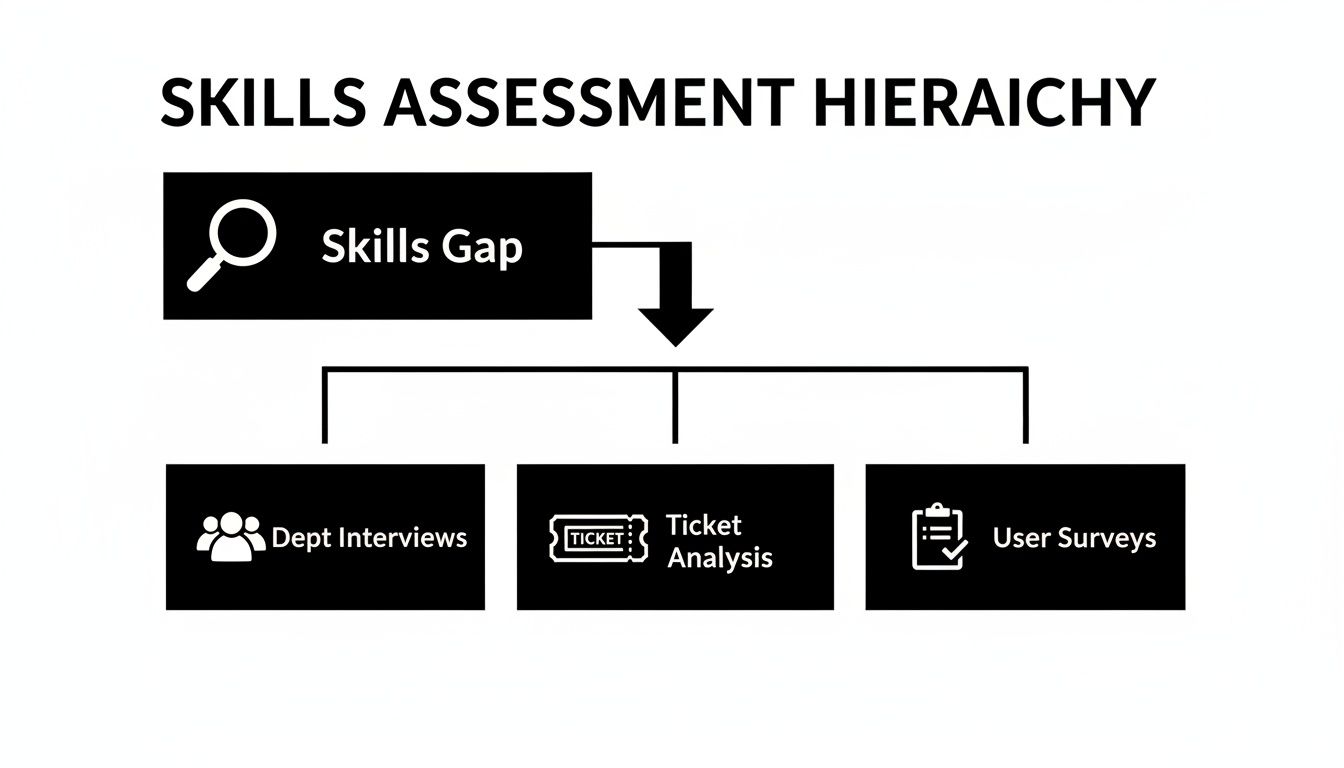
This structured approach connects high-level business needs directly to specific training modules for different teams and user types. It is a strategic method, not just a comprehensive one.
Defining Key User Roles and Their Training Needs
Most organizations can categorize their SharePoint users into four primary groups, each with a distinct training agenda.
End Users: This is the largest group, comprising employees who use SharePoint for daily tasks. Their training should be concise and focused on core functions like co-authoring documents, sharing files securely, and efficiently finding information.
Power Users: These are departmental champions who can handle more advanced tasks. Their curriculum should cover creating and managing lists, building basic approval flows with Power Automate, and customizing team sites.
Site Owners: Typically department heads or project managers, these users manage specific sites. Their training must focus on user access control, page layout fundamentals, and basic content governance. For a detailed walkthrough, our guide on how to create a SharePoint site covers the process from the ground up.
Administrators: This is your small, technical team responsible for the entire SharePoint environment. Their training is highly specialized, covering platform-wide governance, security configurations, and integration with other Microsoft 365 services.
Real-World Training Scenarios
Consider a law firm as an example. Paralegals (End Users) must master version control and secure external sharing for sensitive case files. The firm’s partners (Site Owners) need to know how to restrict permissions on confidential client matters. The IT manager (Administrator) is focused on enforcing data retention policies to meet compliance requirements. It is the same platform, but the required skill sets are entirely different.
For businesses handling sensitive data, proper SharePoint training can significantly reduce compliance risks. Untrained users are a common source of misconfigured permissions, which can lead to costly data breaches. Targeted training that prevents even a single breach delivers a clear and immediate return on investment.
By designing separate but coordinated learning paths, you ensure every employee gains practical skills without being burdened by irrelevant information. This targeted method boosts confidence and encourages the immediate application of new knowledge.
Clear documentation is essential when rolling out role-based training. Understanding how to create training manuals helps capture these distinct learning paths, ensuring that the knowledge is retained long after the initial sessions are complete.
Choosing the Right Training Delivery For Your Team

The content of your SharePoint software training is critical, but how you deliver it is equally important. An unsuitable format can undermine even the best curriculum, leading to disengaged employees and poor knowledge retention. The goal is to select a delivery method that aligns with your team’s culture, schedules, and learning preferences.
A one-size-fits-all approach is rarely effective. Busy executives may not have time for multi-day workshops, while other team members might require a hands-on, instructor-led session to grasp complex topics. Matching the format to the role and the material is essential for success.
Comparing Common Training Formats
Each delivery method has distinct advantages and disadvantages. It is important to weigh them against your business priorities—such as cost, scalability, and immediate impact—to design a program that works.
Live Instructor-Led Workshops: This format is ideal for teaching complex, role-specific skills. The interactive environment allows for immediate feedback and personalized guidance, which is invaluable for topics like permissions management or workflow design. The primary challenge is scheduling, especially for busy or geographically dispersed teams.
Self-Paced E-Learning Modules: This option provides maximum flexibility, allowing employees to learn at their own convenience and revisit materials as needed. It is a scalable and cost-effective way to cover foundational knowledge but is less effective for addressing complex, company-specific problems that require direct interaction.
Hands-On Virtual Labs: This method provides a safe, simulated environment where users can practice skills without impacting live data. It is particularly useful for administrators and power users who need to test configurations and customizations before deploying them.
Adopting a Blended Learning Approach
For most organizations, a blended approach that combines different formats is the most effective solution. This model creates a layered learning experience that reinforces knowledge by balancing flexibility with focused, expert-led instruction.
A typical blended model might include:
- Foundational Knowledge: Use self-paced videos and e-learning modules to cover fundamentals like file navigation and document co-authoring.
- Deep-Skill Development: Schedule live, interactive workshops for more complex topics, such as building automated workflows for the operations team.
- Ongoing Support: Establish a permanent knowledge base and create short, on-demand videos to provide continuous support long after the initial training concludes.
This hybrid method respects employees' time by delivering foundational concepts flexibly while reserving valuable live sessions for high-impact, interactive learning. It is a pragmatic solution that boosts both engagement and return on investment.
Many businesses find that poor end-user training is their biggest obstacle to technology adoption, often resulting in a significant drop in productivity. A thoughtful delivery strategy is a key component of harnessing technology adoption for a competitive edge. You can explore how providers are addressing these challenges with specialised Microsoft SharePoint training options. When training is accessible and relevant, you build lasting confidence and ensure your SharePoint investment delivers its full value.
How to Measure Your Training Program's ROI
After implementing a targeted SharePoint software training program, how do you demonstrate its value to business leaders? To secure ongoing investment, you must prove the program's business impact. Reporting on course completion rates is not enough; you need to draw a direct line between the training and tangible results, such as improved efficiency, reduced risk, and better cost control.
The key is to shift focus from training activities to operational outcomes. By connecting what your team learned to positive changes in their behavior, you can build a compelling business case for the program's effectiveness.
Key Performance Indicators for Training Success
A strong business case relies on a combination of quantitative and qualitative data. The right mix of metrics provides a complete picture of how the training is improving your organization’s performance and resilience.
Here are a few of the most impactful KPIs to track:
- Reduction in IT Support Tickets: This is one of the most direct measures of ROI. A 20% decrease in help desk requests related to permissions, file recovery, or basic site navigation translates into direct cost savings.
- Increased User Adoption Rates: Use SharePoint’s built-in analytics to monitor usage patterns. Are more employees actively using the platform? Is co-authoring increasing? Are new team sites being created and used for active collaboration? These trends indicate that the platform is becoming an integral business tool.
- Improved Compliance and Governance: Look for a decrease in governance-related errors, such as documents saved in incorrect locations or improper permissions being applied. For businesses in regulated industries, this metric demonstrates a tangible reduction in business risk.
Gathering Qualitative Feedback and User Confidence
Quantitative data tells only part of the story. You also need to understand how the training has affected your employees' confidence and experience with the platform. Post-training surveys are an excellent tool for this.
Ask direct, focused questions:
- On a scale of 1 to 5, how confident are you now when sharing documents externally?
- Has the training made it easier to find the information you need to perform your job?
- Do you feel the new workflows are saving you time each week?
When you receive positive feedback on these types of questions, it indicates that you have done more than just teach skills—you have removed friction from employees' daily work. This increase in user confidence is a powerful, albeit less tangible, sign of a successful program.
Demonstrating a clear return on investment is crucial for sustaining any training initiative. For additional ideas, you can adapt concepts from a 7-metric framework for measuring training ROI. When you connect these KPIs to high-level business goals, you are no longer just discussing training—you are demonstrating real, measurable business value.
Making Your SharePoint Training Stick
Effective SharePoint training is not a one-time project; it is an ongoing commitment to continuous improvement. The real goal is to integrate SharePoint proficiency into your company's operational culture, ensuring that skills and practices evolve with your business needs.
The final stage is about ensuring knowledge retention. This involves integrating what your team has learned into their daily routines and creating support systems that empower them long after the initial training is complete.
Integrate Training into Your IT Strategy
SharePoint training cannot exist in a vacuum. To have a lasting impact, it must be woven directly into your broader IT and business strategy.
A practical first step is to make role-specific SharePoint training a mandatory component of your employee onboarding process. This ensures that every new hire learns to use the platform correctly and securely from day one, preventing bad habits from forming.
You should also align your training schedule with your technology roadmap. For example, if you plan to roll out a new automated workflow for invoice approvals next quarter, schedule targeted training for the finance and operations teams a few weeks in advance. This proactive approach prepares your team to adopt new features, maximizing their impact and reducing resistance to change.
Launch a SharePoint Champions Program
One of the most effective ways to sustain learning is to identify and empower internal experts. A "SharePoint Champions" program involves selecting skilled and enthusiastic users from different departments to serve as the first line of support for their colleagues.
These champions receive additional, more advanced training, giving them the confidence to answer common questions and promote best practices within their teams.
This approach establishes a peer-to-peer support network that significantly reduces the volume of tickets sent to your IT department. It also fosters a sense of ownership and expertise throughout the company, encouraging everyone to become more invested in using the platform correctly.
For a champions program to succeed, it is important to officially recognize the contributions of its members. Acknowledging their efforts in team meetings or performance reviews validates their role and maintains their motivation.
Schedule Regular Refresher Sessions
SharePoint is not a static platform; Microsoft continuously adds new features and updates existing ones. A best practice from a year ago might be outdated today.
Due to this constant evolution, scheduling regular refresher training is essential for keeping your team's skills current and your data secure.
These sessions do not need to be extensive. A quarterly one-hour workshop focused on a specific new feature or a common challenge is often sufficient to keep everyone's knowledge up to date. This is a simple way to reinforce key governance policies and introduce productivity-enhancing updates that users might otherwise overlook, ensuring your organization continues to get the most out of its investment.
A strategic approach to SharePoint training transforms it from a cost center into a driver of productivity, security, and compliance. To ensure your program remains aligned with your business goals, consider partnering with an experienced IT advisor.
The team at Tricord I.T Solutions can help you design and maintain a training program that turns your team into a strategic asset. Contact us today for a consultation.